
 Nombre de usuario
 Crear Cuenta

CSR Generation: HSphere
- Log into your user Control Panel.
- Click SSL on your control panel home page.
- Enable SSL for the domain in the list.
- One the Edit SSL page click the Import SSL certificate link.
- On the page that appears, click Generate a temporary SSL certificate and certificate request.
- On the page that appears, edit and apply your details by clicking the Submit button:
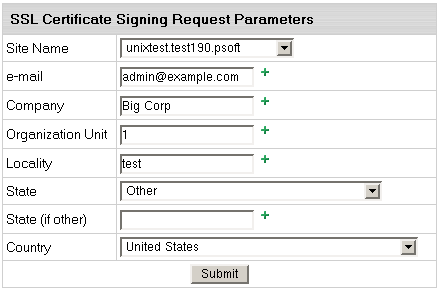
These data will be used to generate the certificate. Don't make changes to the data if you are not sure about the purpose of these changes.
- Follow instructions that appear at the top of the next page.



- SSL Certificate Signing request. It includes the details that you submitted on the previous step. Use this request to get an SSL certificate from Comodo.
- SSL Server Private Key. This is the secret key to decrypt messages from your visitors. It must be stored in a secure place where it is inaccessible to others. Don't lose this key, you will need it if you get a permanent certificate.
- Temporary SSL Certificate. It validates your identity and confirms the public key to assure the visitors that they are communicating with your server, not any other party.


